How a Cross-Connect Inside a Data Center Actually Works
What a data center cross-connect is, how one gets ordered and built, and the fiber details that trip people up.
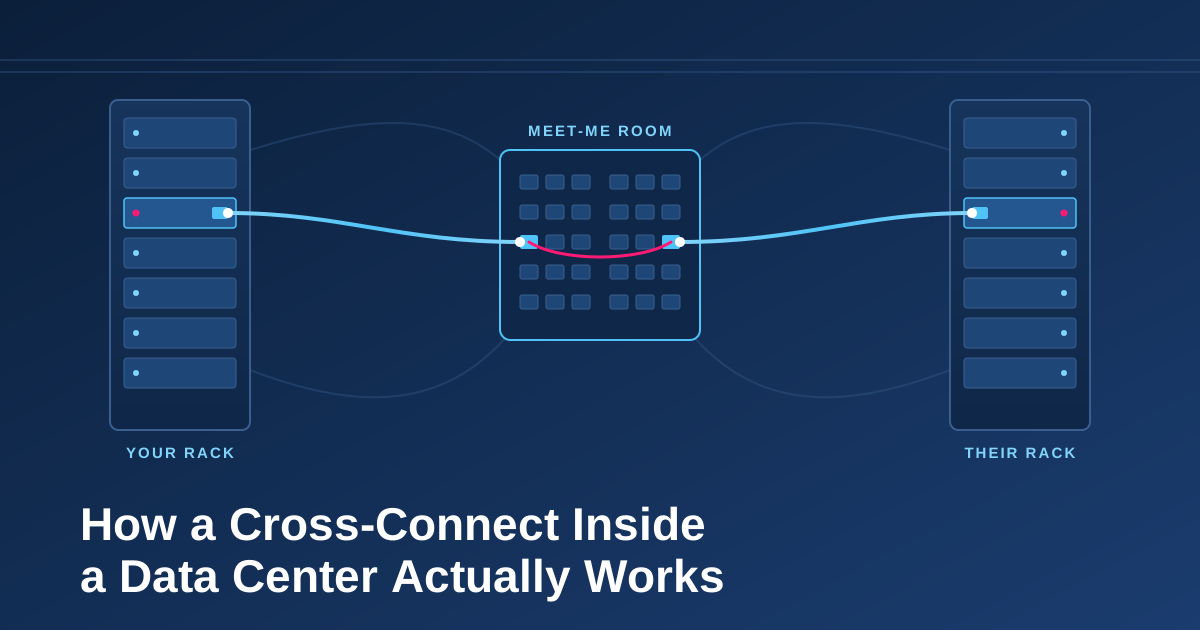
What is a cross-connect? A cross-connect is a dedicated physical cable that links two parties' equipment inside the same data center. That might be your router and a carrier's router, your cage and a cloud provider's cage, or your switch and an internet exchange's switch.
It's a literal piece of fiber (or occasionally copper) running from one patch panel to another. Nothing sits in the middle to route, switch, or inspect your traffic. That's why cross-connects are the foundation of interconnection.
The pieces involved
Your equipment. A router or switch in your rack, cage, or suite.
Your patch panel. Most colocation customers have a patch panel at the top of their rack or at the edge of their cage. This is the demarcation point — the data center's responsibility ends here, and yours begins.
The meet-me room (MMR). A secured, centralized space where connections between tenants come together. Carriers, exchanges, and cloud providers typically terminate large bundles of fiber here so they can reach any customer in the building. Some Data Centers have formal MMRs. Some don't.
Structured cabling between them. The Data Center maintains fiber pathways (overhead trays, underfloor runs, and intermediate distribution frames) that tie every customer panel back to the MMR.
The other party's patch panel and equipment. The same setup on the far side.
A finished cross-connect is simply a continuous optical path: your port → your panel → building cabling → MMR → building cabling → their panel → their port.
How a cross-connect gets ordered
1. Agree on what you're connecting to
You and the other party (say, an internet exchange) agree on a service: a 10G or 100G port, for example. The optics type and fiber type need to match on both ends.
2. Get the LOA-CFA
The party you're connecting to issues a Letter of Authorization – Connecting Facility Assignment (LOA-CFA). It does two jobs:
- Authorizes the data center, or contractor, to run the physical cable
- Assigns the exact location: the cage, panel, and port positions where the cable should land.
Without a valid LOA-CFA, the data center won't run the cable. It keeps anyone from connecting into another tenant's gear without permission.
3. Place the order with the data center
You submit the cross-connect order to the facility operator, along with the LOA-CFA and your own panel and port assignment. The operator usually bills a one-time install fee and a monthly recurring charge. Who pays is negotiated between the two parties, but it's commonly the customer ordering the connection.
4. The data center builds it
The operator's technicians patch from your panel to the MMR, through any intermediate frames, and out to the far-end panel. Everything is labeled with a circuit ID at each point so it can be traced later.
5. Test and turn up
Once the cable is in place, the operator typically tests for continuity and light levels. Then both sides plug in optics, check that the link comes up, and verify receive power is within spec. For an internet exchange port, this is where the IX configures your port and you bring up BGP sessions with the route servers and any bilateral peers.
Fiber details that trip people up
Single-mode vs. multimode. Most modern cross-connects are single-mode fiber (OS2), which supports long runs and higher speeds. Multimode still shows up for short, in-cage runs. Mismatch the fiber and the optics, and the link won't come up (or will be unstable).
Connector types. LC is the most common connector on modern gear. SC still appears on older panels. The LOA-CFA and your order should specify connectors so the right patch cords go in.
TX and RX (a.k.a. "rolling the fiber"). A duplex fiber has two strands: one to transmit, one to receive. Your transmit has to land on their receive. If the link is dark after install, the first fix is often swapping the pair, known as rolling the fiber.
Light levels. Too little light means dirty connectors, a bad patch, or a long path. Too much light can overload a receiver on short runs. Check your optic's specs, and ask for readings if something looks off.
Speed vs. cable. The cross-connect itself isn't "10G" or "100G." The fiber is passive. Speed is set by the optics and ports on each end, which is why the same cross-connect can often be reused when you upgrade, as long as the fiber type and connectors support the new optics.
Cross-connects and internet exchanges
Connecting to an internet exchange is one of the highest-value uses of a cross-connect. One cable from your cage to the exchange's switch opens the door to peering with every network on the fabric: content providers, ISPs, CDNs, and enterprises. Traffic stays local, takes a shorter path, and doesn't eat into your transit bill.
That's the whole idea behind FD-IX. The cross-connect is the physical first step, and the exchange is what makes it worth ordering.
Quick checklist before you order
- Confirm port speed, optic type, and fiber type (single-mode vs. multimode) with the other party.
- Get a current LOA-CFA with exact panel and port assignments.
- Know your own panel and port positions.
- Clarify who pays the data center's install and monthly fees.
- Keep the circuit ID handy for testing and troubleshooting.
- Have clean patch cords and compatible optics ready for turn-up day.
Want to connect to FD-IX? Reach out to our team and we'll walk you through the LOA-CFA and turn-up process.